About Polycom Communicator
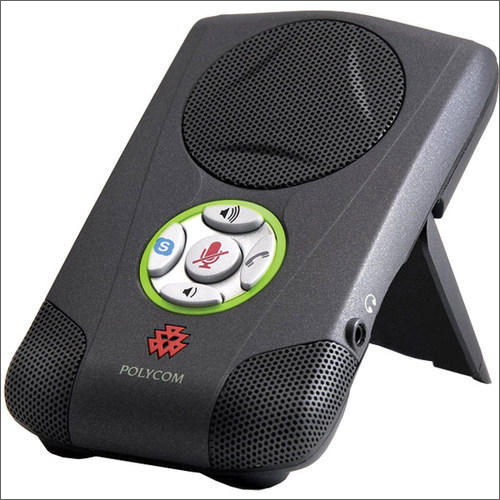
With in-depth industrial experience, and expert professionals, we are profoundly engrossed in bringing forth A-one Polycom Communicator to the honored clients. It is the best quality communication device that is connected to a computer system for use with calls made over. Ideal for private conversations, and official talks, it is made of high quality plastic body, hi-tech speakers, mesh speaker cover, and other electronic components with ultra-modern technology ensuring its mind-blowing performance, high efficiency and longevity. Featured with five soft touch operating keys, and headphone pin port, Polycom Communicator has industry proven designs, weight of 150g, and dimension of 8.2 x 13.3 x 2.2cm
Wide Compatibility Across Leading VoIP PlatformsThe Polycom Communicator works seamlessly with popular VoIP and softphone applications such as Skype, Windows Live Messenger, Yahoo! Messenger, and Google Talk. Simply plug it into any PC running Windows XP, 2000, or Vista with a USB port and get started immediately without external drivers.
Superior Audio with Full Duplex & Noise ReductionExperience premium sound quality during your calls with the built-in wideband audio technology. The device features dynamic noise reduction, echo cancellation, and a sensitive microphone, allowing natural conversations free from interruptions even in busy environments.
Effortless Controls and Desktop IntegrationDesigned for user convenience, the Polycom Communicator features touch-sensitive volume and mute controls. It is lightweight and compact, making it perfect for mobile professionals and desktop use alike. Integration with Microsoft Office Communicator further enhances its utility for business communication.
FAQ's of Polycom Communicator:
Q: How do I install and set up the Polycom Communicator on my computer?
A: Simply connect the Polycom Communicator to your PC's available USB 2.0 port. No additional software is required for installation. The device is compatible with Windows XP, 2000, and Vista. Once connected, you can select it as your preferred audio device in your softphone or conferencing application.
Q: What is the maximum microphone pickup range and how does it benefit group calls?
A: The Polycom Communicator has a microphone pickup range of up to 7 feet (2 meters), allowing multiple participants to converse naturally around a desktop, making it ideal for small group calls and collaborative meetings.
Q: When should I use the Polycom Communicator instead of my computer's built-in microphone and speakers?
A: Use the Polycom Communicator when you need higher voice clarity, echo cancellation, and advanced noise reduction-especially during professional VoIP, web conferences, or group calls where natural, wideband audio is essential.
Q: Where can I use the Polycom Communicator most effectively?
A: This device is perfect for office desks, huddle rooms, or any portable work environment. Its compact size and USB-powered operation make it versatile for both permanent setups and on-the-go use with laptops.
Q: What is the process to mute or adjust the volume during a call?
A: The Polycom Communicator features touch-sensitive buttons on its surface, allowing you to quickly mute the microphone or adjust the speaker volume during a call for optimal convenience.
Q: How does the Polycom Communicator enhance audio quality during conversations?
A: It delivers high-fidelity wideband audio, full duplex sound, and incorporates dynamic noise reduction and echo cancellation, providing a professional and distraction-free calling experience.






 Send Inquiry


 Send Inquiry